Residential quotes
What a room and the daily fees will cost, worked out from the person’s record in ACWS and your own room prices, for the family to take away before anyone moves in.
Before your first quote
- ACWS connected, so the person’s approval, class and contributions can be read.
- Your homes and their rooms at their prices, in Homes & Room Prices.
- A Microsoft 365 mailbox connected, if you want to email the quote from Purser.
 6:13
Open a quote
Choose Residential Quote in the menu for someone who has called or written to you. From a residential referral on the My Aged Care screen, Quote opens the same page with the person’s name, date of birth, care recipient id and referral already filled in. The page says which referral it is quoting for and reads ACWS straight away.
1. The person
Enter their given name, surname, date of birth and care recipient id, then choose Read from ACWS. Services Australia releases the record only when the details match. The quote then shows what ACWS holds:
- their residential approval, and any other approvals;
- their AN-ACC class, or “Not yet assessed”;
- their hotelling contribution and non-clinical care contribution, each a daily amount;
- whether they are in residential care already, and since when.
If ACWS holds no contribution yet, enter the amounts from the letter Services Australia sent them. If the person will not disclose their income and assets, tick the box that says so, and both contributions are charged at the maximum.
If ACWS shows them in residential care before 1 November 2025, the page warns you: the transitional arrangements for people already in care may apply to them instead. The quote applies the rules for people entering care from 1 November 2025, and says so.
2. The room
Pick the home, then a room. Each room shows its kind and its published price. With no homes yet, the page offers Add a home and its room prices, which opens Homes & Room Prices.
3. Payment and fees
Choose how the room would be paid for: a Lump sum (RAD), a Daily (DAP) payment, or a Combination, where you enter the lump sum paid and the rest is charged daily.
The basic daily fee and the maximum permissible interest rate come from the national fee schedule HealthOS has loaded. Where HealthOS has not confirmed the current figure, the field says You enter this: take the basic daily fee from the Department of Health, Disability and Ageing’s Schedule of Fees and Charges for Residential Care, and the interest rate the Department publishes for the quarter the person would move in. Your browser remembers what you last entered. If no national fee schedule is loaded at all, a quote cannot be priced; email support@healthos.net.au.
Then choose Prepare quote.
4. The quote
The quote names the home and the room, and shows the room price, how it is paid, the basic daily fee, the daily accommodation payment, the two contributions from ACWS, the total a day and about a month. Where part is paid as a lump sum, it also shows the lump sum on entry and the most you may keep from it each year (retention). It names the fee schedule and the interest rate period it used, and says it is an indicative quote under the Aged Care Act 2024.
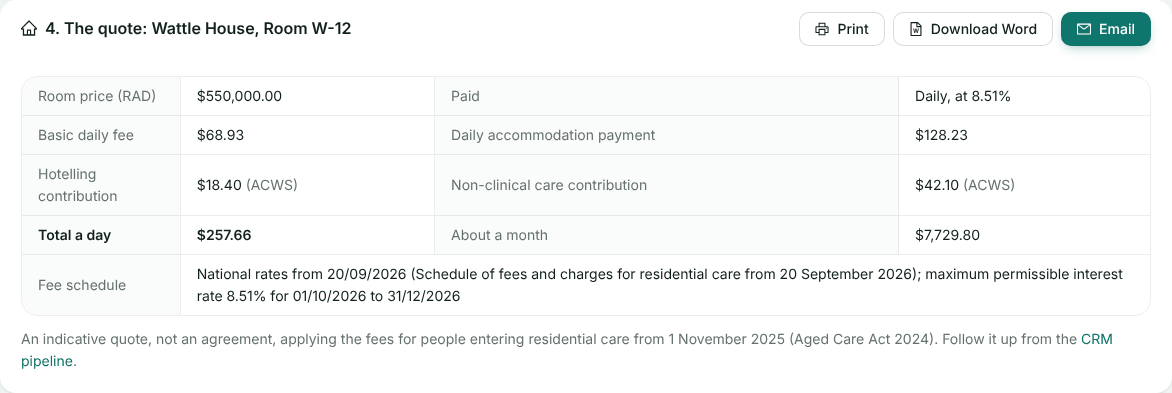
A room priced above the maximum accommodation price is flagged, because charging it needs approval first.
Send it
- Print it, or Download Word to change it before you send it yourself.
- Email it to the person or their family, with an optional note above the quote. It goes from the home’s Microsoft 365 mailbox, or your default one. Without a connected mailbox, the Email button is replaced by “Connect a Microsoft 365 mailbox to email families from Purser.” and a link to the set-up: see Microsoft 365 mailboxes.
What happens next
The quote itself is not stored. Follow the family up from the CRM pipeline. An emailed quote is logged on the My Aged Care referral it was opened from; it is not added to a CRM enquiry, so note it there with Log an email if you work the family from the pipeline. When the family accepts, choose Draft agreement: the quote is priced again, kept exactly as accepted, and the agreement drafted from it. See Agreements.
Still stuck? Email support@healthos.net.au