Coding in the Code Navigator
Code against the Alphabetic Index and Tabular List, with no patient attached, and watch the DRG change with every code. Nothing on this screen is recorded.
 3:55
The Code Navigator is in both plans, Coder and Coder + AI.
The grouper and edition
The pickers at the top say what you code in. The Code Navigator opens on AR-DRG v11.0 and the active ICD-10-AM edition; ACHI follows the diagnosis edition. Once a grouper is chosen, the edition list offers only the books that go with it (ICD-10-AM and ACHI for AR-DRG). Choose another edition to code an episode under the books in force at the time. The grouper list offers the AR-DRG and MS-DRG versions your site holds, for example MS-DRG v44 for the FY2027 ICD-10-CM and ICD-10-PCS books. The DRG is marked Concept preview: during the tech preview it is for evaluation only. Export PDF sits beside the pickers.
The code books
Where your site holds the published code books, the Help menu (the ? at the top of the screen) lists them under Code books on the coding screens, for the edition you are coding in. Each opens in a reader in a new tab, with a contents list and a search box for the headings. The Alphabetic Index, which is published in three sections (diseases and injuries, external causes, and the Table of Drugs and Chemicals), opens as one book with a tab for each section. A section that has not been prepared for reading yet says so on its tab, and Original downloads the publisher’s file.
Describe the stay
The DRG depends on the stay as well as the codes. In The stay, choose Edit and set the age, sex, length of stay, whether it was same day, hours of ventilation and admission weight where they apply. Choose Done.
Find and add codes
Start with the principal diagnosis
Type a condition (“diabetes”) or a code (“E11.43”) in the search box and press Enter. Ctrl+K jumps to the box from anywhere on the screen.
Follow the Index or the Tabular List
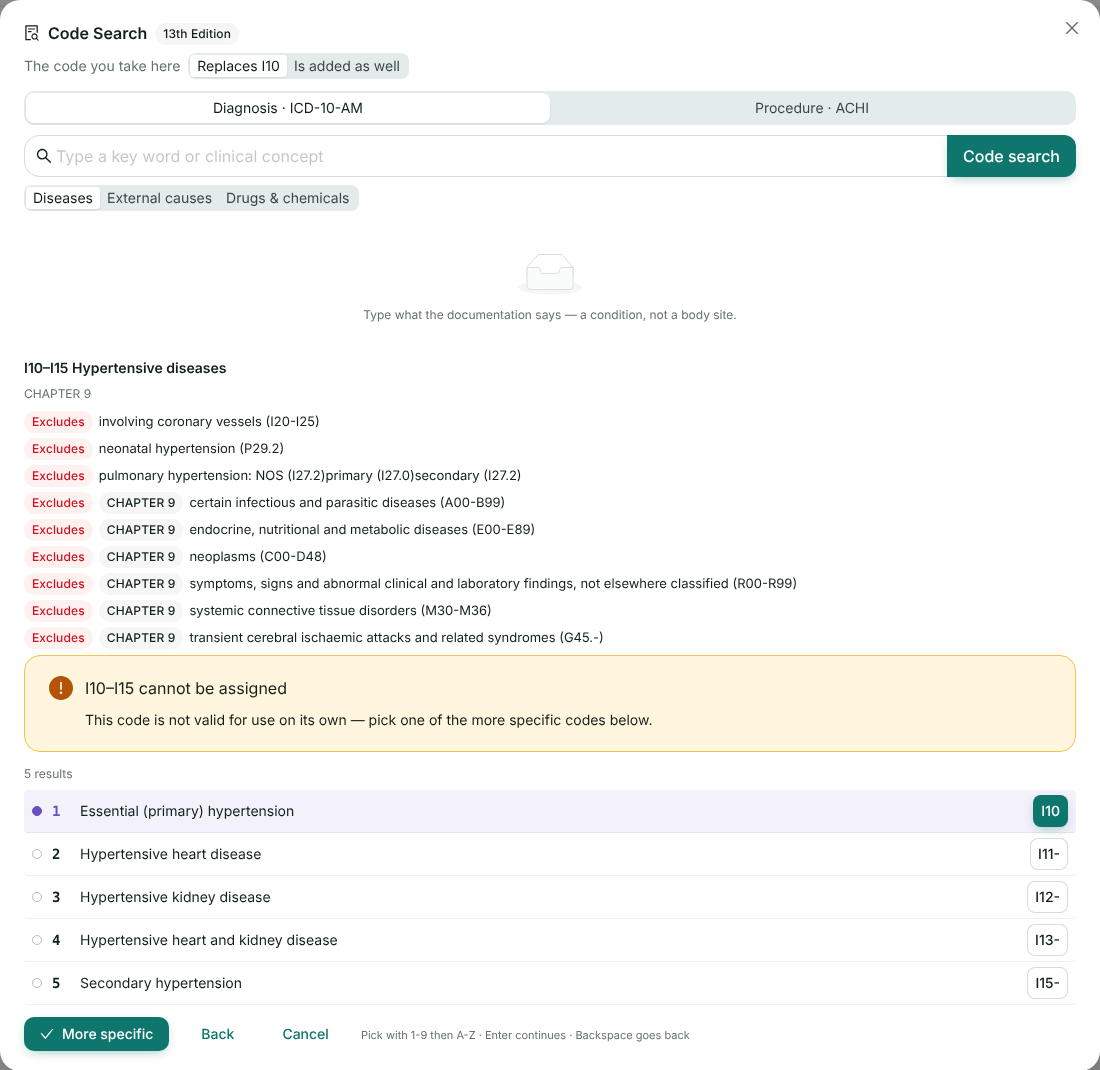
Words open the Alphabetic Index; a code opens the Tabular List. A term that only points elsewhere shows where (“see”), and double-clicking it follows the reference. Take the code you want and it is added to the worksheet. Hover over a suggested code button to see its title before you add it.
Keep going
The first diagnosis is the principal; later ones are additional. Procedures are recognised by their format and go to their own section.
The worksheet
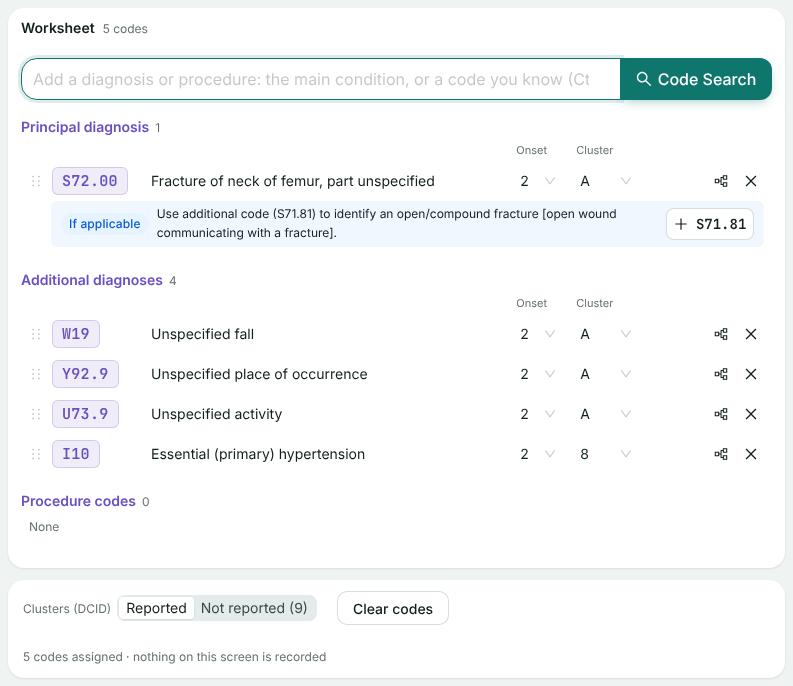
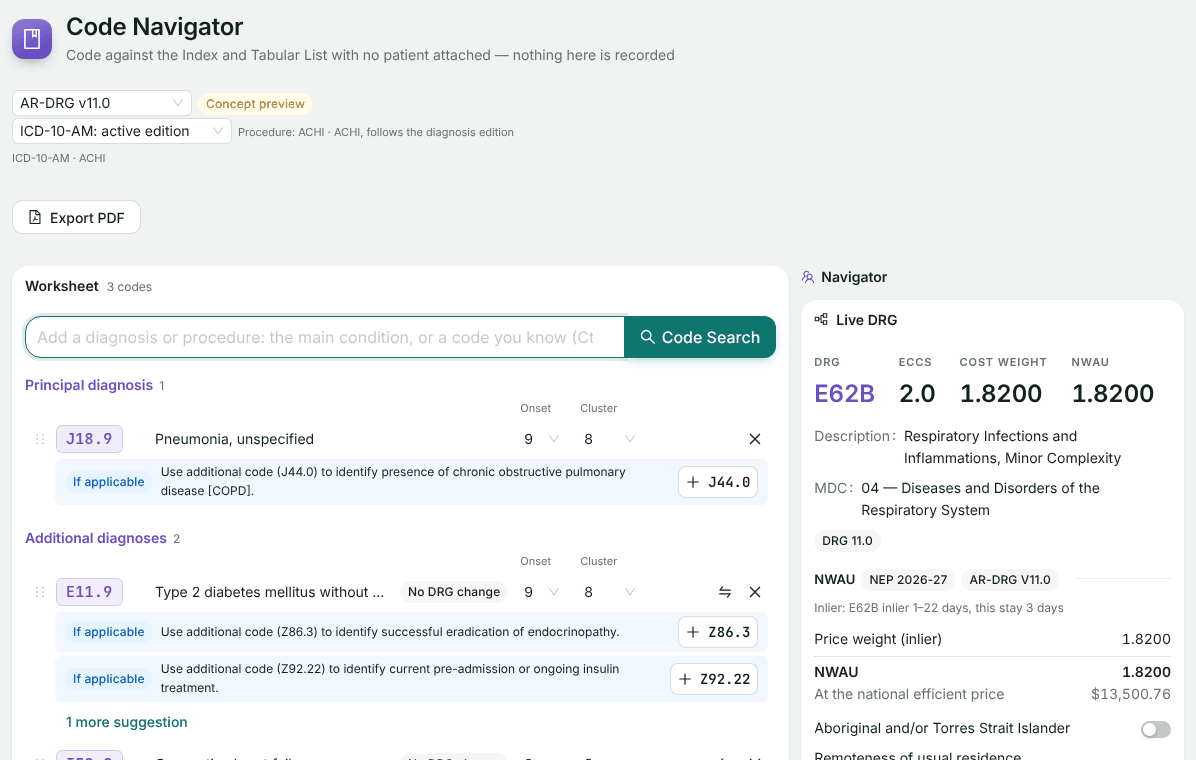
The worksheet lists your codes in three sections: principal diagnosis, additional diagnoses and procedure codes.
- Reorder or change section by dragging. Drag a code by its handle onto another code, or onto a section. Drag an additional diagnosis onto Principal diagnosis to make it the principal: the code that held it moves to the top of the additional diagnoses. Diagnoses and procedures stay in their own sections.
- Replace a code with the one beside it. The codes-beside button on a row opens the Tabular List at that code’s neighbours. Above the list, choose whether the code you take Replaces the one on the row (the default; it keeps its place, onset flag and cluster) or Is added as well.
- Condition onset flag. A new diagnosis starts at 2, not noted as arising during the episode. Set 1 for a condition that arose during the stay; a code on the hospital-acquired complications list then counts as a complication.
Diagnosis clusters (DCID)
From the Thirteenth Edition, each diagnosis has its DCID, the cluster it belongs to. The worksheet fills it in from the classification, and you can change any value:
- An injury, or any condition with an external cause (an adverse effect, a complication of care), shares a letter with the external cause, place of occurrence and activity codes that follow it: A for the first, then B, and so on.
- Injuries next to each other, from one event, share a letter. A second event gets the next one.
- The chronic condition supplementary codes are 0; everything else is 8, not clustered.
- A value you choose, or one saved with the coding, is kept as the rest are recalculated.
Below the worksheet, Clusters (DCID) switches between Reported and Not reported (9), for a site or state that does not report the DCID yet (Western Australia in 2025–26, for example).
The live DRG
The Live DRG panel groups the worksheet as it stands: the DRG, its severity, ECCS, PCCL, cost weight and NWAU. Beside each code, a tag shows what it does to the DRG: No DRG change, or the DRG the episode would group to without it. Codes on the hospital-acquired complications list are tagged HAC.
Assign a principal diagnosis to see a DRG.
Prompts and alerts
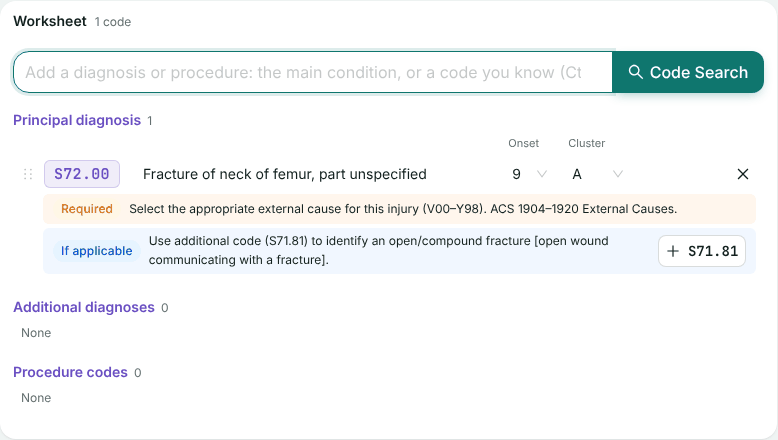
Under each code, Required and If applicable prompts suggest the codes the classification and coding standards call for; + code adds one. The Navigator column flags what is still outstanding, for example:
- The classification still requires a code.
- The coding standards point to another code.
- Diagnosis clusters are incomplete.
- National or state coding advice applies to these codes.
When everything is clear it says Nothing outstanding on the codes assigned so far.
When you are done
Nothing on this screen is saved. Coding list (PDF), at the top below the pickers, keeps a coding summary with the DRG and its details; Clear codes, below the worksheet, starts again.
Codes that came from Code Captain (Open in Code Navigator on its results) open with a From Code Captain note at the top. There, Final report (PDF) exports the whole episode: your codes and what you changed, Code Captain’s reasoning and decision tree, the episode outline, and the redacted documents with each coded passage highlighted. See Finish in the Code Navigator.
If something goes wrong
- No grouper configured: coding works normally, but no DRG can be shown. Use Contact support in the Help menu.
- The DRG could not be calculated: check the stay details, then try again.
ICD-10-AM/ACHI/ACS and AR-DRG Classification Systems Copyright © Independent Health and Aged Care Pricing Authority. All rights reserved. Copyright in the Licensed Material is owned by the Independent Health and Aged Care Pricing Authority. ICD-10-AM is based upon the International Statistical Classification of Diseases and Related Health Problems, Tenth Revision (ICD-10) 2019, COVID-expanded © Copyright World Health Organization. All rights reserved. Modified by permission for Australian Government purposes.
Still stuck? Email support@healthos.net.au