Find the right code faster Grouping problems caught before the episode is finalised.
Code Navigator is the coding screen from HealthOS on its own: the index, the tabular list and the live diagnosis related group.
- Right the first time. Your coders verify each code in the tabular list, and the Navigator lists what it still requires.
- Nothing kept on our side. The Code Navigator records nothing you code, so the coding list goes to your own system as a PDF.
- Sign in and code. It runs in the browser, with no implementation project and nothing to connect to your patient administration system.
Tech preview, free until 1 January 2027. Parts of the product are still being finished, so nothing is charged while the preview runs. Sign up without a card and add one whenever you like. We may end the preview earlier, and you will hear from us before anything is charged.
Diagnosis related group output is for evaluation only during the tech preview. The Australian Refined Diagnosis Related Groups it shows is produced with Australian diagnosis codes from the 13th edition, grouped by the V11.0 grouper. That pairing is not the official one, so do not use the diagnosis related group for claiming, funding, reporting or clinical decisions.
 4:00
Australian diagnosis and procedure coding, with the coding standards a code cites beside it.
V11.0 grouping, on a grouper certified for AR-DRG V12.0 and V11.0 (Code Navigator 1.0 on Docker/Linux).
Live today for coding in the United States books.
The AI autocoder, with its own page: see Code Captain.
Coded right the first time
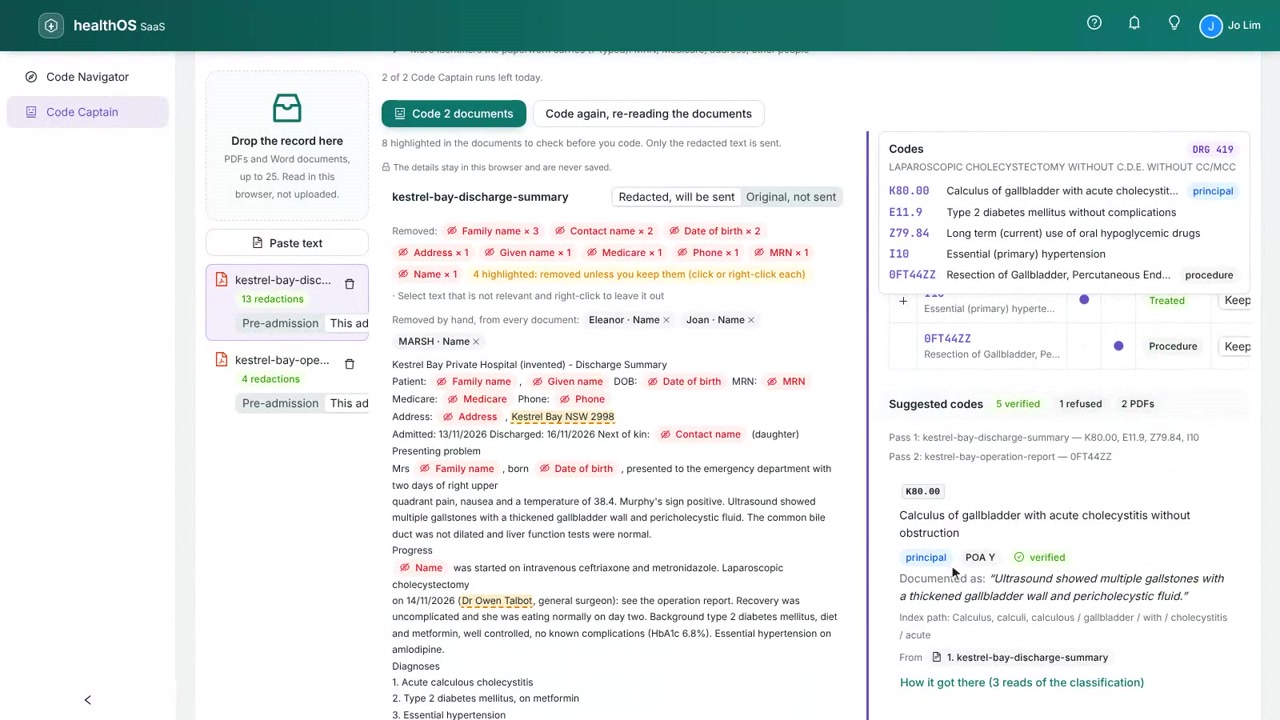
Diagnoses and procedures are coded in one worksheet. Each code is verified before it is taken, with what the standards still require beside it.
Find and verify in one place
Type a term and the Code Navigator opens the alphabetic index, with lead terms, modifiers and cross-references as they appear in print. Follow a reference into the tabular list, drill to the character the code needs, and read its inclusions, exclusions and notes before you take it. A code is only ever assigned from the tabular list, because that is where the exclusions live. A code you type straight into the worksheet goes through the same check.
- Diagnoses and procedures in the same worksheet
- Condition onset flags and, from the Thirteenth Edition, the diagnosis cluster on every row
- Hospital-acquired complications flagged against the national list, with the condition onset to confirm
- The coding list exported as a PDF, and nothing on the screen recorded
See what the standards still require
Beside the worksheet, the Code Navigator lists what the codes already taken still require. A "code first" instruction is shown as a warning, because it is not optional. A "use additional code" note is offered, because it applies only when it is clinically relevant. Where a code cites an Australian Coding Standard, the standard is a click away, along with the codes it directs you to assign, and the codes it tells you not to. National and state coding advice is applied in the same place, in the edition and jurisdiction that applies.
- Outstanding "code first" and "use additional code" instructions
- The coding standards each code cites, in the edition that applies
- Codes a standard directs you to assign, with the sentence that directs it
- Codes a standard tells you not to assign, flagged before you take them
- National and state coding advice, in the edition and jurisdiction that applies
Grouped and priced as you code
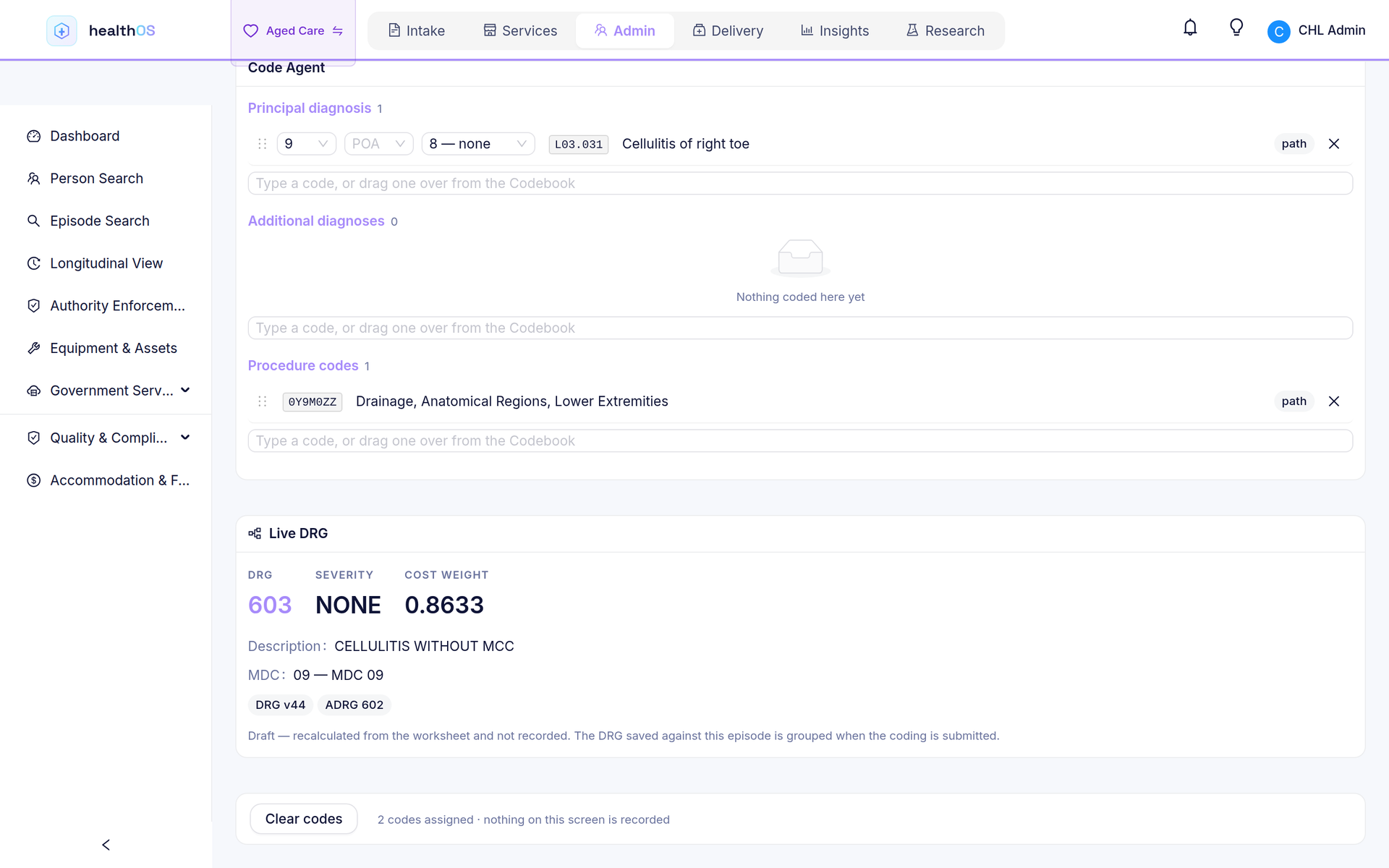
The diagnosis related group updates beside the worksheet as codes are added, on a grouper certified for AR-DRG V12.0 and V11.0, and the episode is priced in National Weighted Activity Units with every step shown. During the tech preview both are for evaluation only.
Catch grouping errors while the record is open
The grouper runs as codes are added, so an error group, an ungroupable episode or a missing data item shows while the record is still open, before the episode is finalised.
A sandbox runs the grouper with no patient attached: set the age, sex, length of stay, hours of ventilation and admission weight yourself, for training or for testing how the grouper treats an unusual case, without opening anybody's record.
- The diagnosis related group beside the worksheet, so grouping errors show early
- A sandbox for training and for testing the grouper on an invented case
See how the episode’s weighted activity was reached
The Live diagnosis related group panel also prices the episode in National Weighted Activity Units, by the National Efficient Price Determination 2026–27. It starts from the price weight for the stay, then applies each adjustment the determination sets out, in its order: paediatric, Indigenous status, the patient’s and the hospital’s remoteness, radiotherapy and dialysis, intensive care unit hours, and the private patient and accommodation adjustments. Every step is shown, so you can see how the figure was reached, and a fact the record does not hold, such as the patient’s remoteness area, can be set in the panel. Weighted activity is shown for the episode, never beside an individual code.
- National Weighted Activity Units for 2026–27, priced from the National Efficient Price Determination 2026–27
- Each adjustment shown in the order the determination applies it
- Missing facts, such as remoteness, set in the panel
- For the episode only, never per code
- For evaluation only during the tech preview: the 2026–27 prices are for Australian Refined Diagnosis Related Groups V12.0 and the Code Navigator groups with V11.0, so this year’s figure is marked illustrative
Price weights and adjustments from the National Efficient Price Determination 2026–27, © Independent Health and Aged Care Pricing Authority, used under CC BY 4.0.
Nothing typed again for the claim
Code Navigator is the coding screen on its own. HealthOS is the record that screen reads from. In a hospital running HealthOS, the coder works from the episode itself: the conditions the patient arrived with are frozen from the pre-admission record at admission, condition onset and hospital-acquired complications come from that comparison, and a finished code set goes on to the claim without being typed again. See clinical coding in HealthOS.
Help where your team needs it
Code by hand, or add Code Captain when you want the first draft done for you. Either way, the coder decides every code.
Let Code Captain write the first draft
Code Captain reads an episode’s documents and proposes the codes, each traced through the Alphabetic Index and Tabular List to the sentence it came from. Its codes land in this worksheet for you to accept, change or reject. It needs no training set, and comes with Code Navigator.
Keep patient identities away from the AI
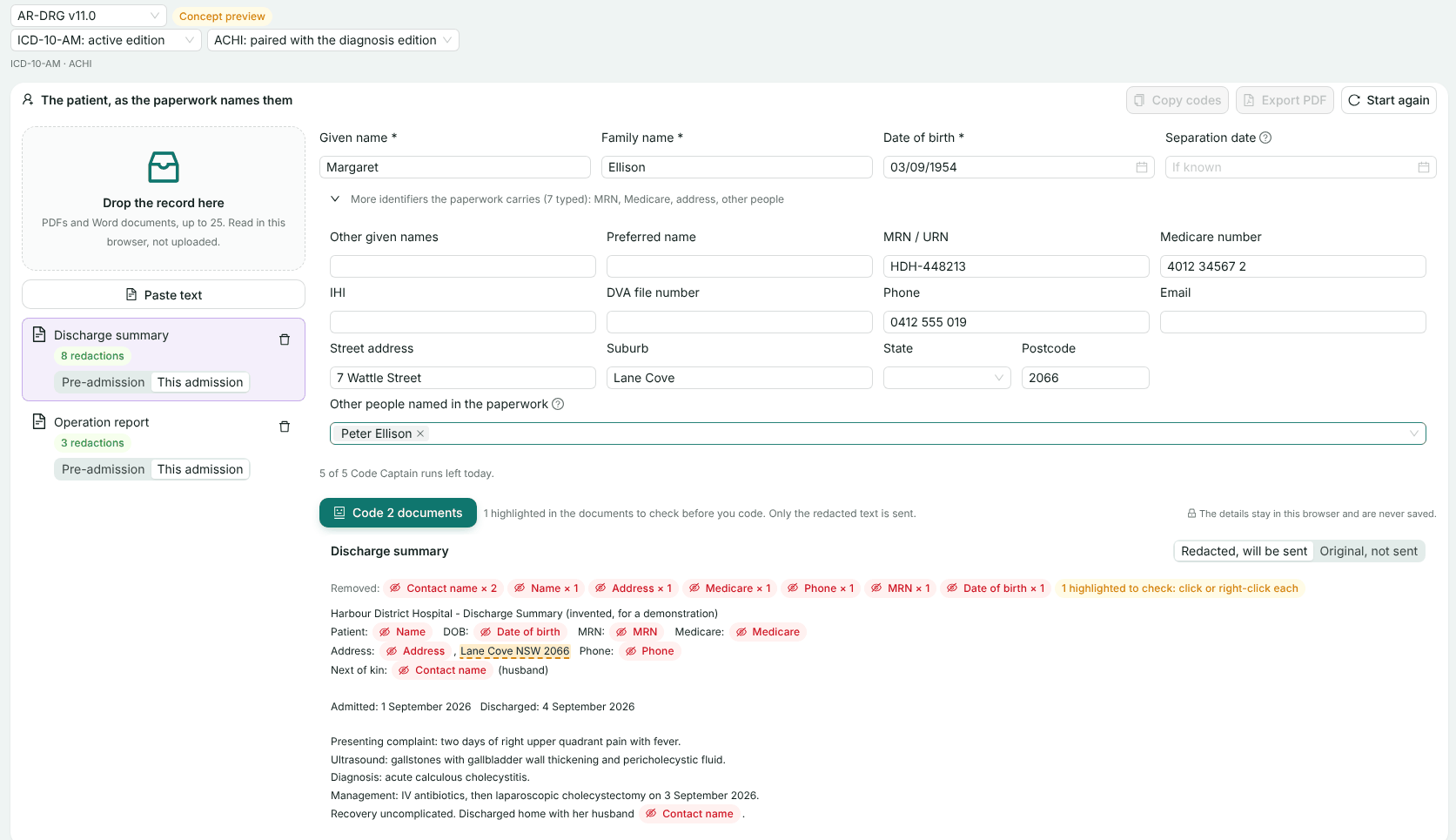
When you upload a discharge summary or an operation report, your browser reads the PDF itself, using text recognition for scanned pages, and removes the patient's identifying details before you see a preview. Only the redacted text you approve is sent. The server checks it again and refuses it if an identifier has survived. Your coding is stored in Australia, in a tenancy that the database itself keeps apart from every other subscriber's.
- PDFs read and redacted in the browser, before anything is kept
- A second check on the server, which refuses text with an identifier in it
- Data stored in Australia
- Each subscriber isolated by row-level security in the database
Priced per coder, per month
Code Navigator, at $79 per coder a month, is the manual coder: the Code Navigator and the live diagnosis related group, without Code Captain. Code Navigator + Code Captain, at $249, adds Code Captain with 200 runs per coder a month, shared across your team, and is in tech preview. Outside a preview, both start with seven days free of the Code Navigator; Code Captain runs on AI, so while the preview is free each person can start a limited number of runs a day. HealthOS online is in tech preview, free until 1 January 2027 unless we end it earlier, and we will tell you before anything is charged. Teams of about twenty coders or more can buy on invoice. See pricing.
- Code Navigator: the Navigator and the live diagnosis related group
- Code Navigator + Code Captain: all of that, plus Code Captain
- Prices in Australian dollars, excluding GST
Start coding today, free during the tech preview
Tech previewBoth run in the HealthOS app. Sign up there to start coding; the tech preview is free for now.
What coding managers ask us first
| Question | Answer |
|---|---|
| Who is it for? | Clinical coders, health information managers, contract coding services and coding auditors who want a better coding screen without changing the hospital's systems. |
| Do I need to install anything? | No. It runs in the browser, and there is nothing to connect to your patient administration system. |
| Which classifications are included? | Australian diagnosis and procedure codes with Australian Refined Diagnosis Related Groups grouping for Australian coding, and United States diagnosis codes, United States procedure codes and Medicare Severity Diagnosis Related Groups for coding in the United States books. The grouper is certified for AR-DRG V12.0 and V11.0 (Code Navigator 1.0, Docker/Linux). |
| Where does my data go? | The Code Navigator records nothing you code. Code Captain’s runs and the redacted documents are kept in Microsoft Azure in Australia until your workspace’s nightly purge, after the period you choose (1 day, 7 days or 30 days). When you use Code Captain, the only thing sent to the AI model is the de-identified text you reviewed and approved in your browser, after a second check on our server. During the tech preview the model runs on Microsoft Azure's global deployment, so processing can happen outside Australia. Microsoft does not use it to train models; under its Azure OpenAI terms it may keep it for a limited time to monitor for abuse. We are testing an Australia-only deployment for organisations that need processing to stay onshore. |
| What happens if I cancel? | Your access ends. The Code Navigator kept no record of your coding, so download the final reports and coding lists you want before you go: see Closing your workspace. A hospital that wants coding worklists and a coding timeline, with every assignment attributed, gets them on the full platform’s clinical coding. |
| Can I start today? | Yes. Code Navigator is in tech preview: join the tech preview with your work email, no card needed, and nothing is charged before 1 January 2027 (or an earlier end to the preview, which we will tell you about first). |
Watch an episode being coded
4:00Code your next episode faster
Free in tech preview until 1 January 2027. Sign up without a card and start coding today.