Turn more enquiries into clients Families say yes sooner, and their budget is spent on care.
Aged Care Purser prices a quote from the person’s record in Services Australia’s Aged Care Web Services and your own prices, for Support at Home and for a room in residential care, follows the family up from your own mailbox, and takes them to an agreement checked against the Aged Care Act and Rules, signed online by the person or their representative. The family downloads the sealed copy, and on the day care starts the signed pack goes into your own records. It is sold on its own, in tech preview now. See residential quotes.
- Quoted on the first call. Show what the government pays, what the person contributes and what is left, with or without a referral.
- Answered before another provider does. The quote opens from the My Aged Care referral and is agreed before you accept it.
- No Provider Digital Access logins. Set up once, then HealthOS reads each person’s classification, budget and contribution rates from Services Australia for you.
Tech preview, free until 1 January 2027. Parts of the product are still being finished, so nothing is charged while the preview runs. Sign up without a card and add one whenever you like. We may end the preview earlier, and you will hear from us before anything is charged.
 3:11
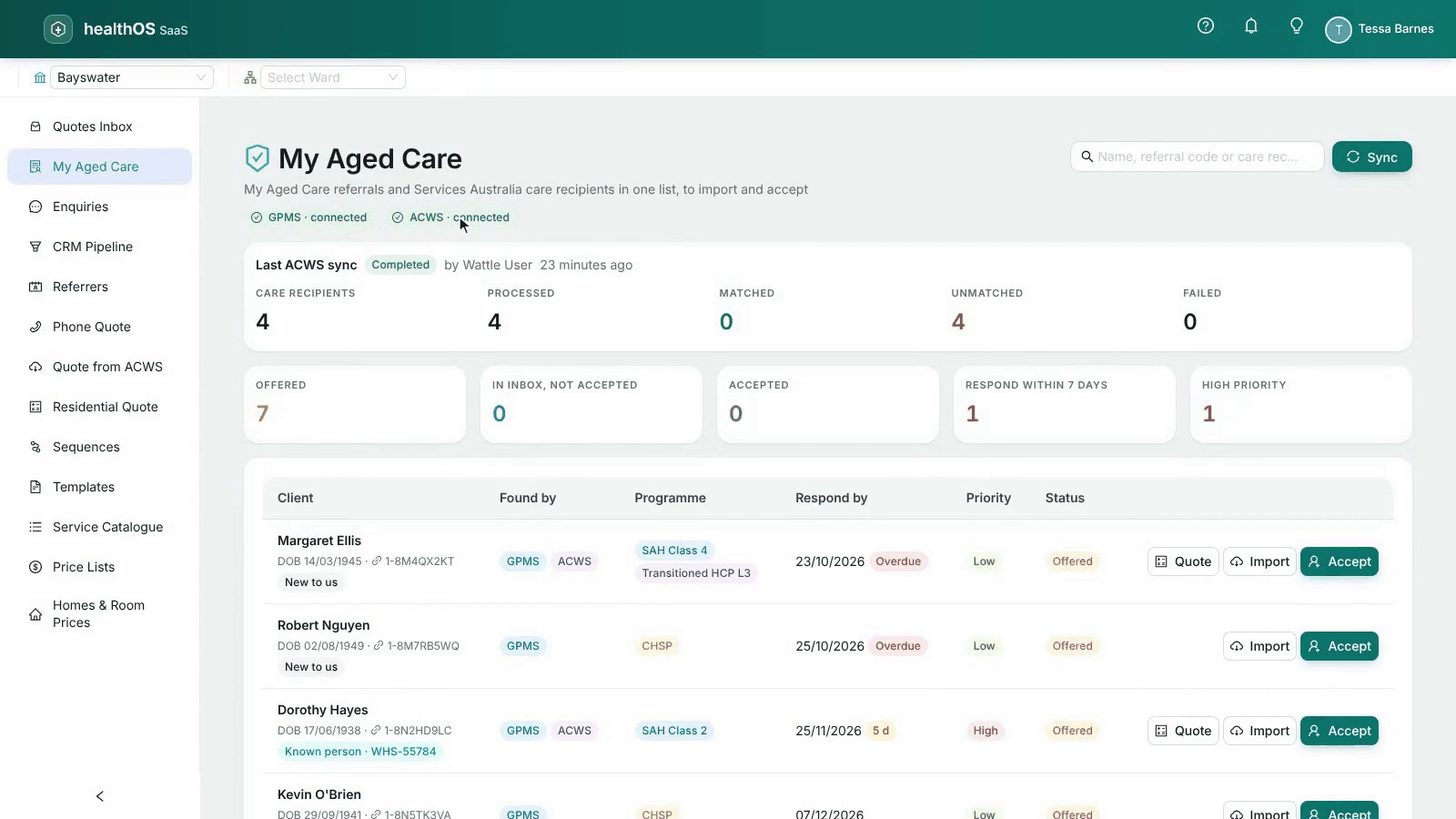
My Aged Care referrals through the government's provider system, each matched to the care recipient Services Australia holds.
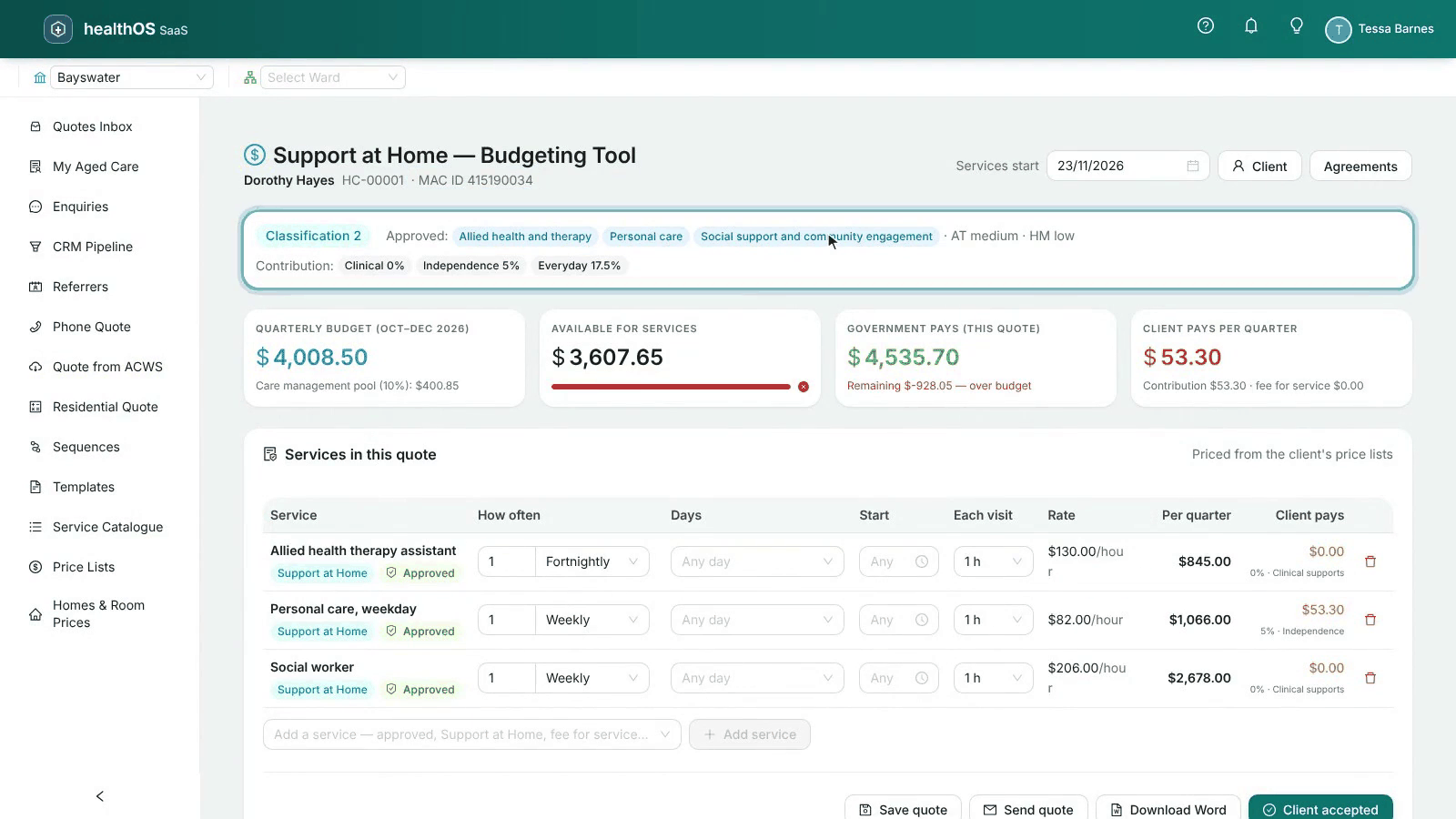
Classification, this quarter’s budget, what is used and what is left, read from Aged Care Web Services.
Each line split by the person’s own rates for clinical supports, independence and everyday living.
Priced from your own price list, so the quote is what you would charge.
Agree the quote before another provider answers
The quote opens from the referral and starts from the person’s live budget and approved services, priced from your own list.
Nothing re-keyed from the referral
Referrals arrive from My Aged Care through the government's provider system, and each is matched to the care recipient Services Australia holds for it. Before accepting one, open a quote from the referral itself: the person’s care recipient id, surname and date of birth carry over, so nobody re-keys them, and the quote is ready when the family says yes.
- My Aged Care referrals through the government's provider system, with your own machine credential
- Each matched to the care recipient record in Aged Care Web Services
- The quote opens from the referral, with the person’s ids carried through
Show what their budget buys
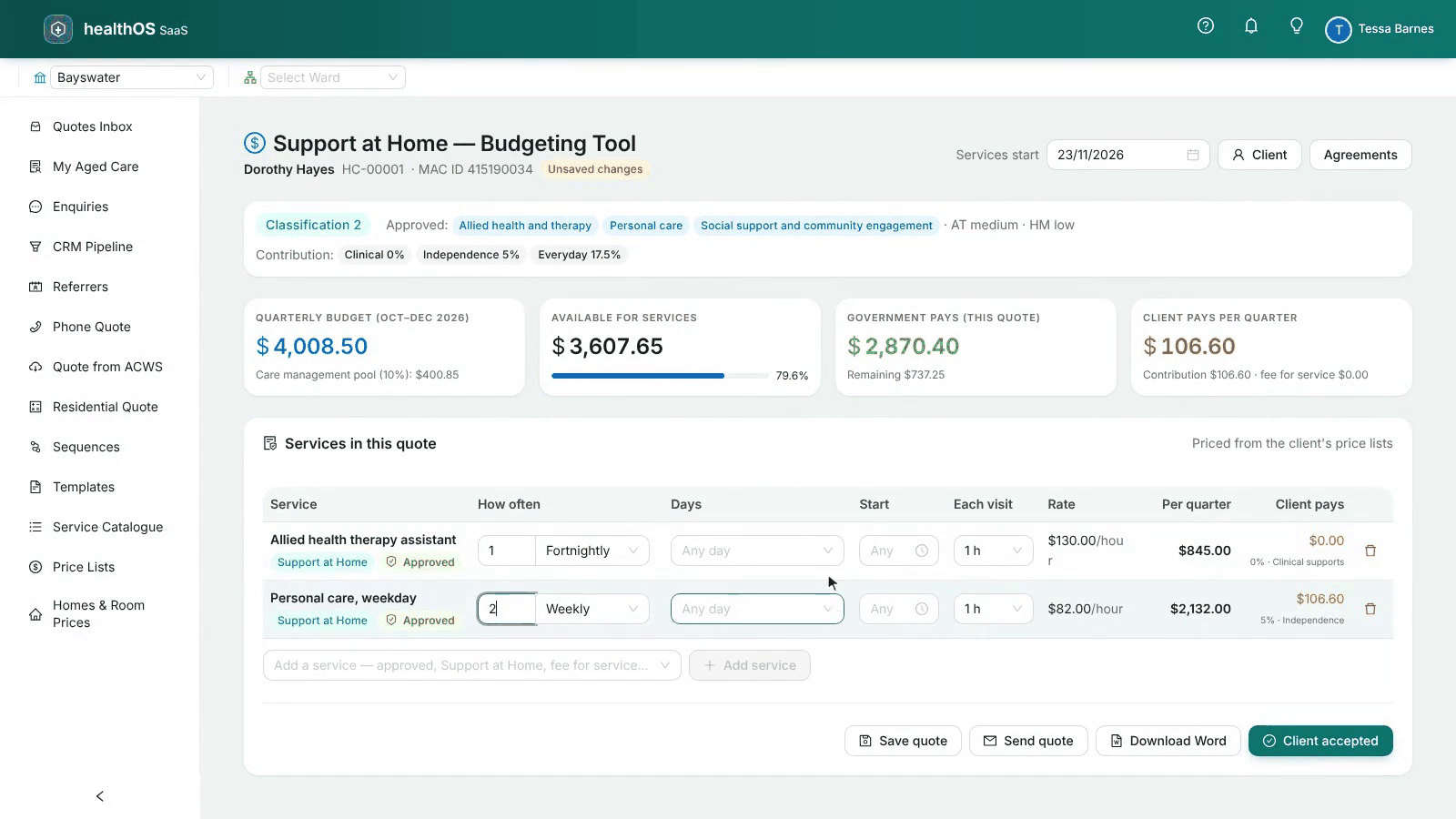
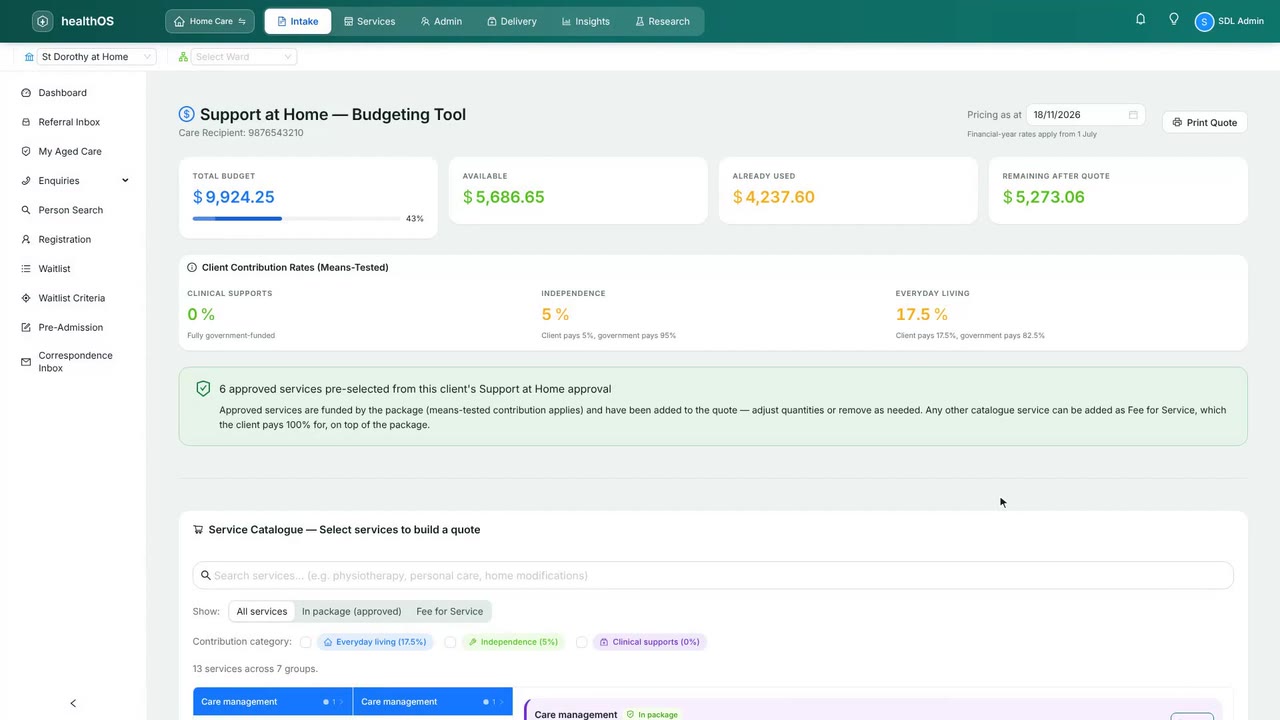
Starting the quote brings the client record up to date from Aged Care Web Services, and the quote begins from the services the person is approved for, priced from your own list. Change how often, add or take off a service, and every line is split by the person’s own rates, so the quote shows what the government pays, what they contribute and what is left of the budget.
When it is right, it downloads as a Word document or is emailed to the family.
- Starts from their approved services
- Each line split by their own contribution rates
- Downloaded as Word, or emailed to the family
Yours the moment they agree
Once the family agrees, accepting the referral lodges the Support at Home entry event with Services Australia, against your service’s NAPS id. That tells My Aged Care, and every other provider, that the person is with you.
Be the provider that answers with a figure
Support at Home changed how budgets and contributions work, and most families meet it for the first time when a parent is approved. They want to know what the classification buys and what they will pay, and most provider websites answer with a phone number.
Win the enquiry from your own website
For families still choosing a provider, a quote page with your name and colours can sit on your own website. The person picks a classification, or “not assessed yet” to see the range, says whether they receive a full pension, and picks services from your price list.
The enquiry lands in your inbox with the figures they saw, so your intake team calls back knowing what the family has seen. A provider that shows a real figure, from its own prices, is the one that gets the call.
Follow every family up until they say yes
A quote is rarely accepted on the first call. Aged Care Purser keeps every enquiry in a pipeline, with the emails to and from the family on the enquiry itself, and follows up on a schedule you set.
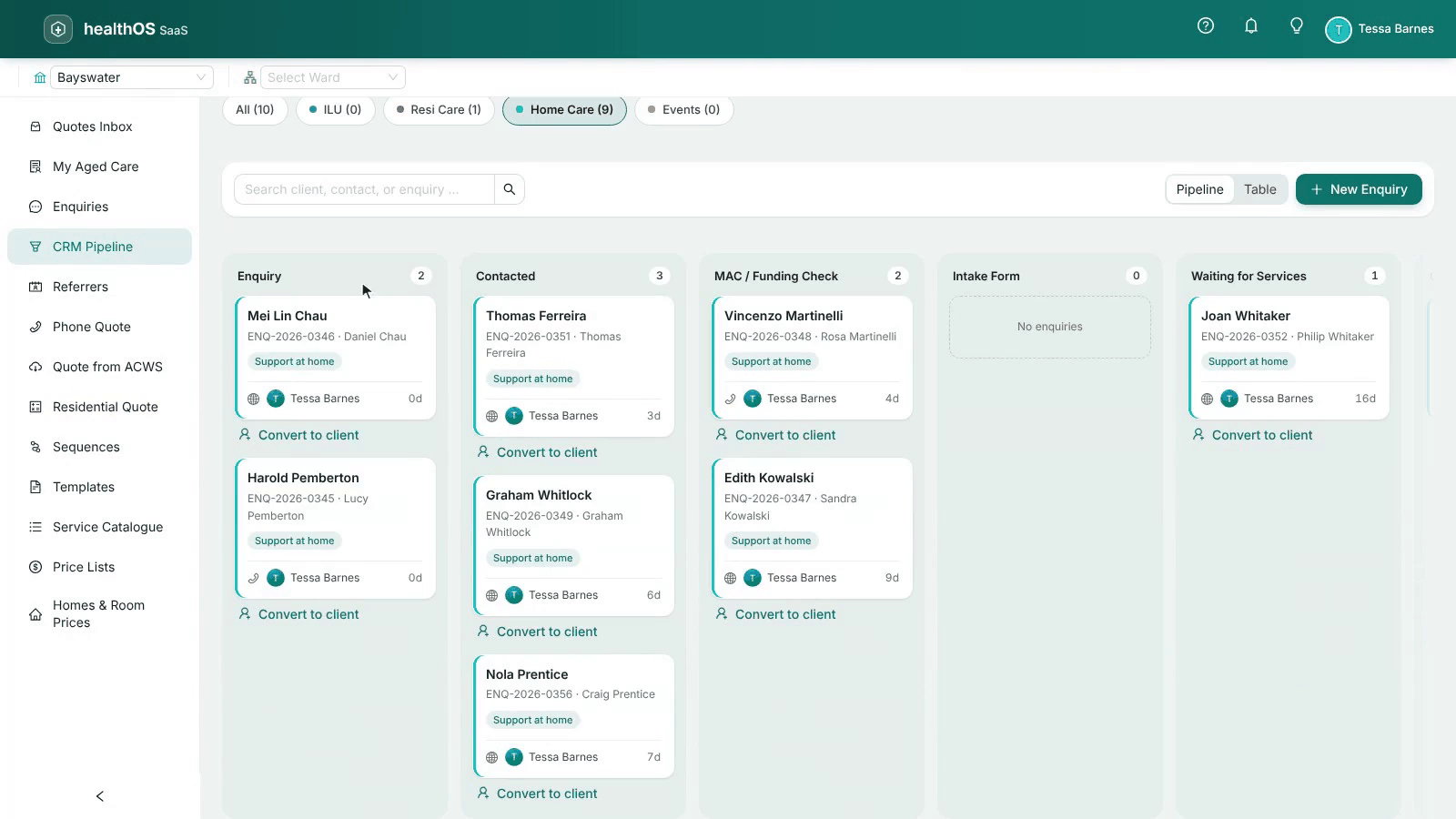
Every enquiry in one pipeline
Phone calls, website enquiries and My Aged Care referrals sit in one pipeline by stage, Support at Home and residential care side by side, each with who is looking after it and how long it has waited.
- A pipeline by stage, with days in stage and who owns each enquiry
- Each enquiry tied to its home
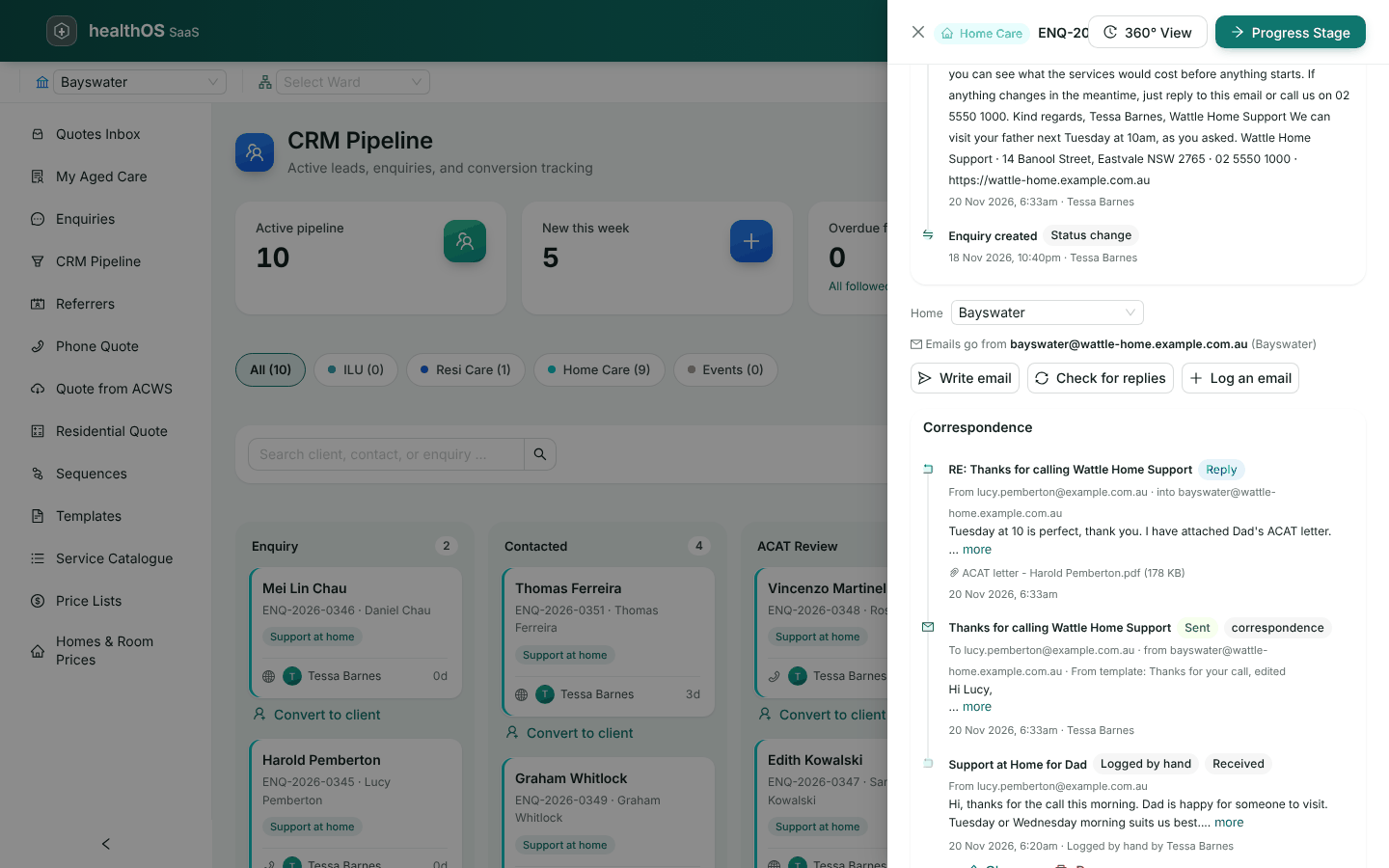
Email from your own mailbox, one for each home
Connect each home’s Microsoft 365 mailbox, or one for the whole service. Write to the family from the enquiry: pick a template, change what you need for this family, and send. It goes from your own address and sits in your Sent items. Check for replies brings the family’s answer onto the enquiry, and nothing else in the mailbox is read.
Until a mailbox is connected, paste an email from your own mail onto the enquiry, so the whole conversation is in one place.
- Each home’s own Microsoft 365 mailbox
- Templates you can change before you send
- Replies brought in when you check, only on that email’s thread
- Emails logged by hand until you connect
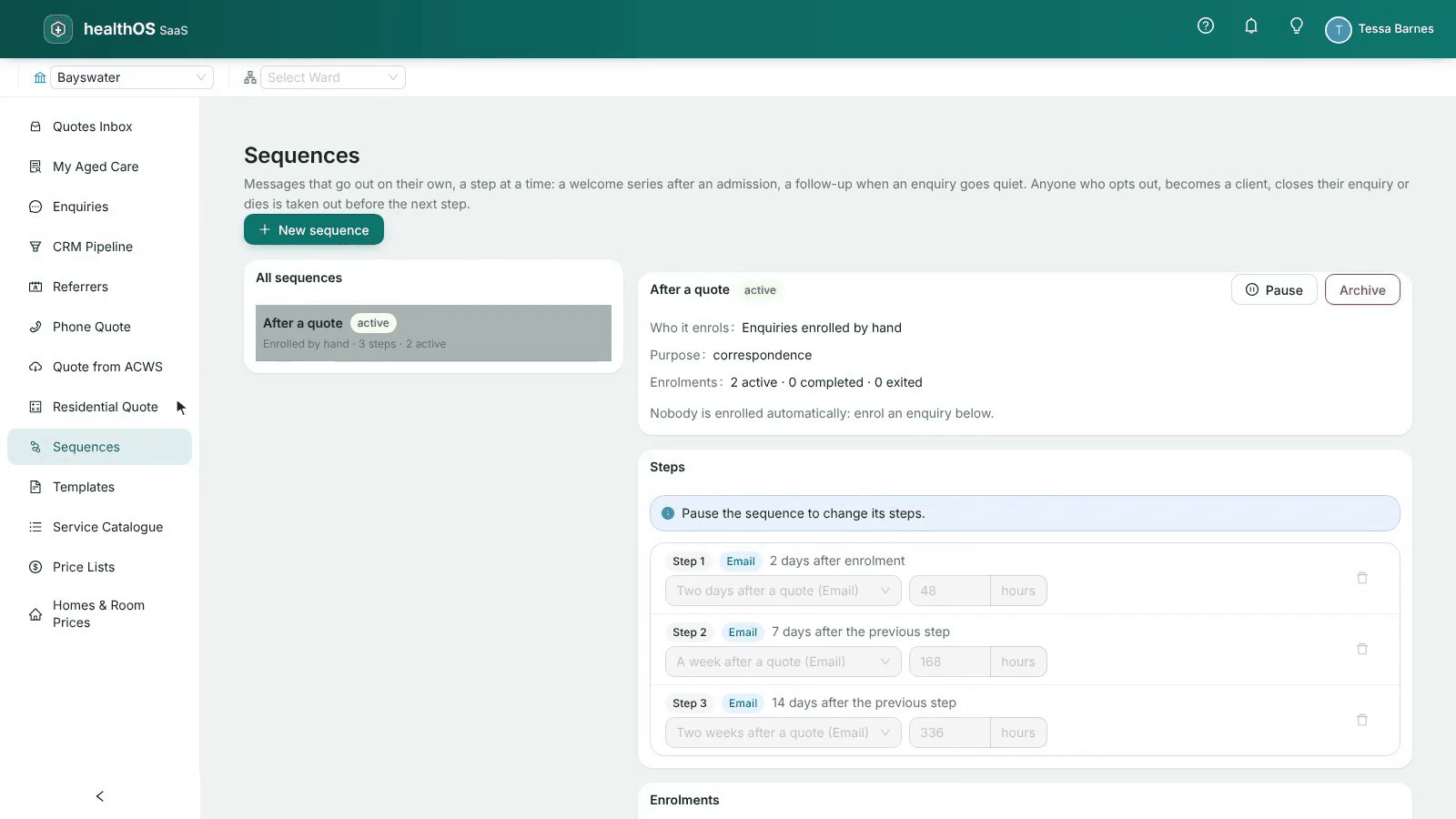
Follow-up sequences that stop by themselves
A follow-up sequence sends each message on its own schedule, and stops by itself when the enquiry becomes a client, is closed, or the person asks not to hear from you.
- Messages from your own templates, on a schedule you set
- Stops when the enquiry is won, closed or opted out
Figures you can stand behind
The budget and contribution rates in a quote come live from Services Australia, through Aged Care Web Services. A My Aged Care referral arrives through the government's provider system and carries neither, so on its own it cannot price a quote. HealthOS reads both, and both connections have passed the agencies’ testing: see where each stands.
- Arrives
- When My Aged Care offers the person to your service, with a date to respond by.
- Carries
- Who the person is and how to reach them, their classification and any short-term tiers, and the services they are approved for.
- Does not carry
- What is left in their budget this quarter, or what they will contribute.
- Good for
- Knowing who to call, and answering before the referral goes to another provider.
- Read
- Whenever you need it, through your own Provider Digital Access device, with the person’s care recipient id, surname and date of birth. Services Australia releases the record only when all three match.
- Carries
- This quarter’s budget with what is used and what is left, their means-tested contribution rates, and their classification, any short-term tiers and approved services as they stand today.
- Does not need
- A referral. A person who rings with their care recipient id can be quoted on the call.
- Good for
- A quote in dollars: what the government pays, what the person contributes and what is left.
Together: the quote opens from the government's provider system referral with the person’s ids carried over, and the figures come from Aged Care Web Services. Someone who calls before any referral is quoted from Aged Care Web Services alone.
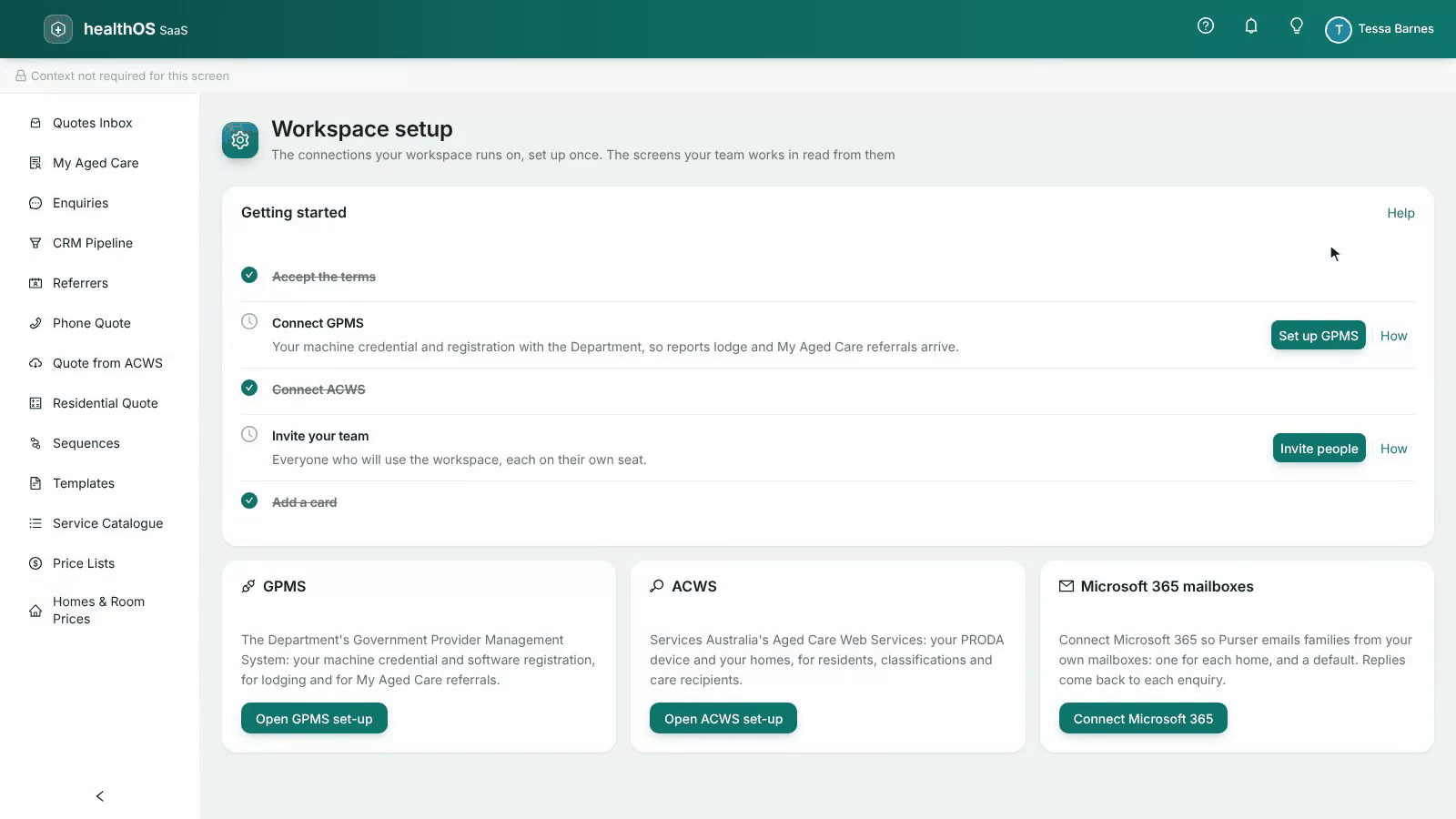
Set up once, with your own credentials
Two set-up guides, both with your organisation’s credentials, never ours. For the government's provider system: your machine credential from the Relationship Authorisation Manager and its ABN, and a test that reads your organisation back. For Aged Care Web Services: your Provider Digital Access device, by its RA number and name, the activation code Provider Digital Access issues, and your Support at Home service by its NAPS id, finished with a test call. Your price list loads from your own services, each with its Support at Home service code and contribution category.
Then connect each home’s Microsoft 365 mailbox, so families are emailed from your own address.
$79 per user a month, free in the tech preview
One monthly subscription, priced per person who signs in, however many clients you support: intake coordinators and whoever looks after your price list. Add or remove users as your team changes. While the tech preview runs, nothing is charged: sign up without a card and add one whenever you like. The preview is planned until 1 January 2027, and you will hear from us before anything is charged. Taking another HealthOS online product as well, such as Care Minutes Periscope, adds it to the same subscription and the same bill.
Quote a room the way the family will pay for it
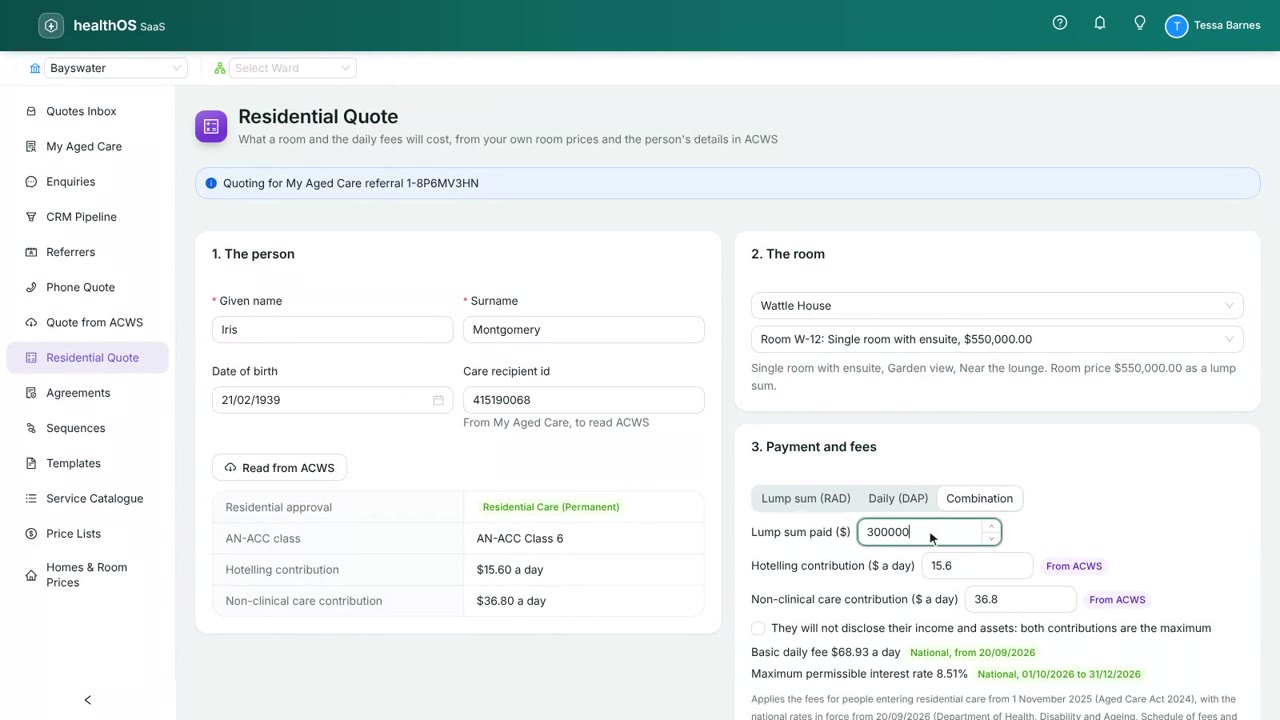
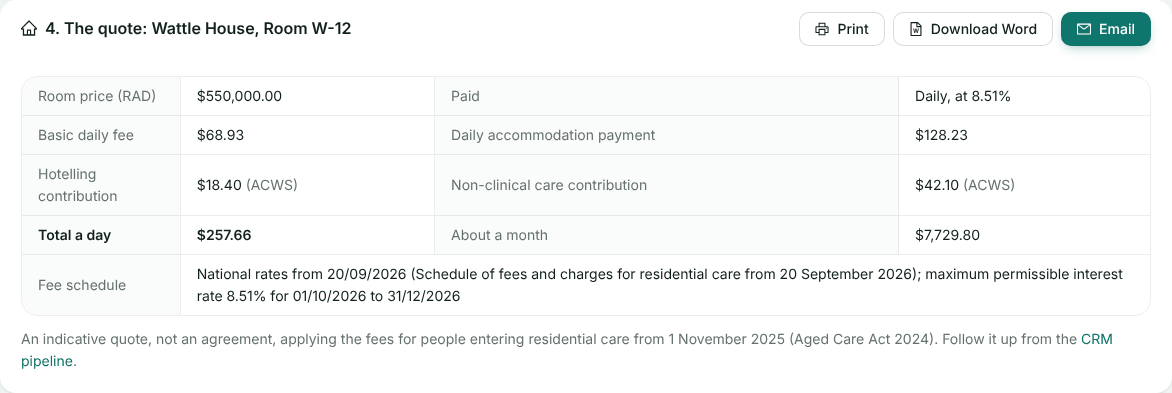
A residential referral arrives through the government's provider system beside your Support at Home referrals. Aged Care Purser reads the person’s residential approval, funding class and their hotelling and non-clinical care contributions from Aged Care Web Services, and quotes the room from your own prices.
- The room. From your own room prices, published home by home.
- How they pay. A lump sum (refundable accommodation deposit), a daily payment (daily accommodation payment) or a combination, with what you keep as retention shown.
- The fees. The basic daily fee and the person’s contributions, a day and about a month, at the national rates from the Department’s published fee schedule.
- Taken away. Printed, downloaded as Word, or emailed from your own mailbox.
Every quote says it applies the fees for people entering care from 1 November 2025, and warns you when Aged Care Web Services shows the person was already in care before then.
Your rooms, home by home
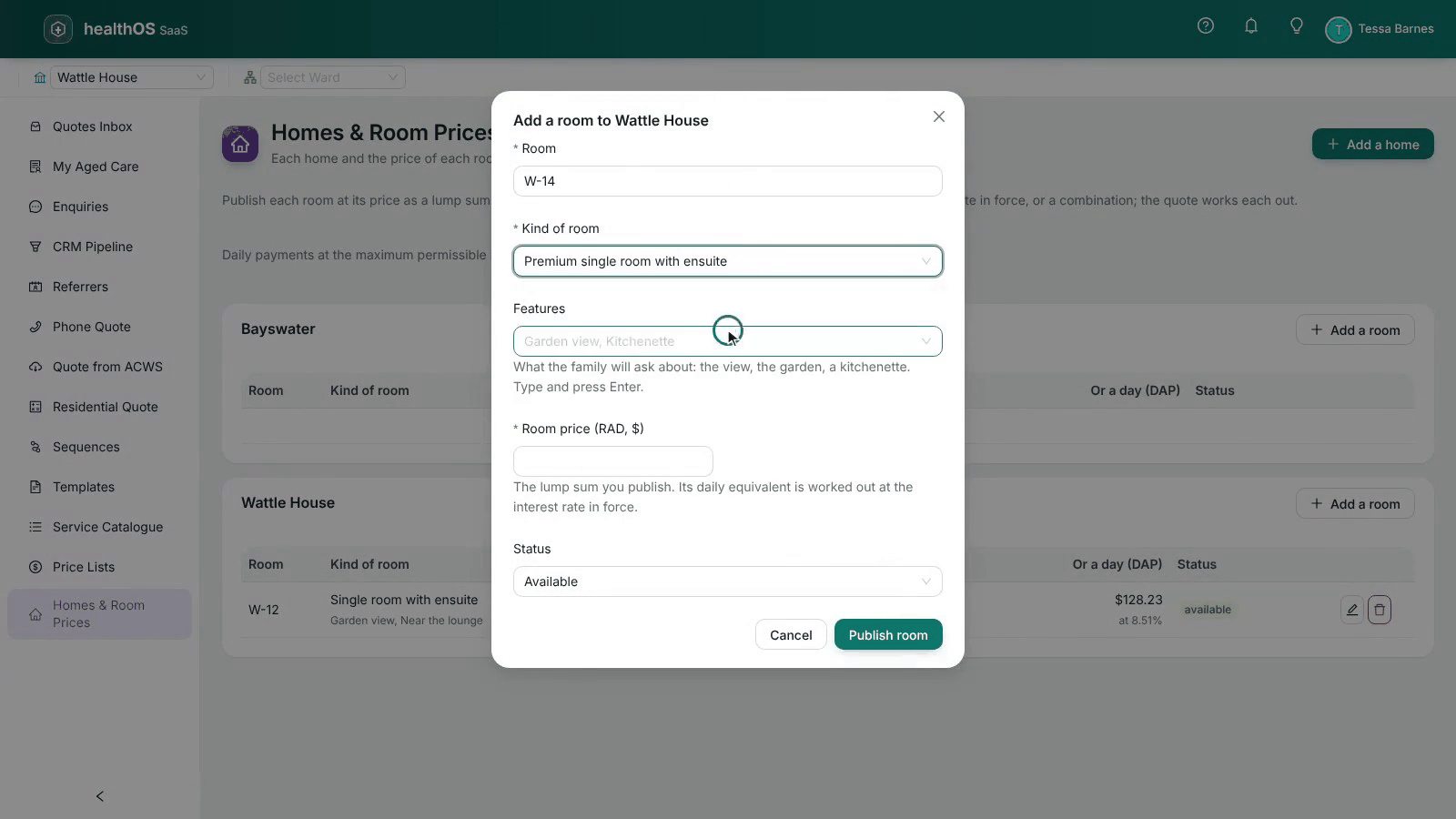
Publish each home’s rooms at their lump-sum price, with what the family will ask about: the kind of room and its features. The daily equivalent is worked out at the interest rate in force, so the quote and the price list always agree.
What providers ask us first
| Question | Answer |
|---|---|
| Can I use it today? | Yes. Aged Care Purser is in tech preview: join the tech preview, no card needed, and nothing is charged before 1 January 2027 (or an earlier end to the preview, which we will tell you about first). It reads the client’s budget and contribution rates from Services Australia. |
| Does it cover residential aged care? | Yes: the residential referral through the government's provider system, the person’s approval and contributions from Aged Care Web Services, a room from your own prices paid as a refundable accommodation deposit, a daily accommodation payment or both, and the Residential Care Agreement, checked against the Aged Care Act and Rules and signed online. When the person enters care, the signed pack goes into your own records. Care after admission is part of the full HealthOS platform. |
| Does it cover higher everyday living fees? | A higher everyday living agreement is made only after the person has entered care, and only if they choose to, so it belongs with the system that keeps their record from admission. The full HealthOS platform has it. |
| Is the figure exact? | From the referral, yes: the classification, the budget and the person's own contribution rates come from Services Australia. On your website, before anyone is assessed, part pensioners and self-funded retirees see a range, because Services Australia's means assessment sets their rate. |
| What do I need to connect? | For the government's provider system, your organisation's machine credential, registered against your ABN. For Aged Care Web Services, a Provider Digital Access device registered to your organisation and your Support at Home service's NAPS id. The set-up guides cover each step. |
| Do I need to replace my care management system? | No. The calculator, its quotes and its enquiries stand on their own. |
| Where is the data kept? | In Microsoft Azure in Australia, in a tenancy that the database itself keeps apart from every other subscriber's. |
Watch a quote come together
Show families a real figure, from your own prices
Aged Care Purser is in tech preview for residential and home care providers: free until 1 January 2027, then $79 per user a month. Join with your work email, no card needed.