Meet care minutes without over-rostering Keep your funding without paying for hours you don’t need.
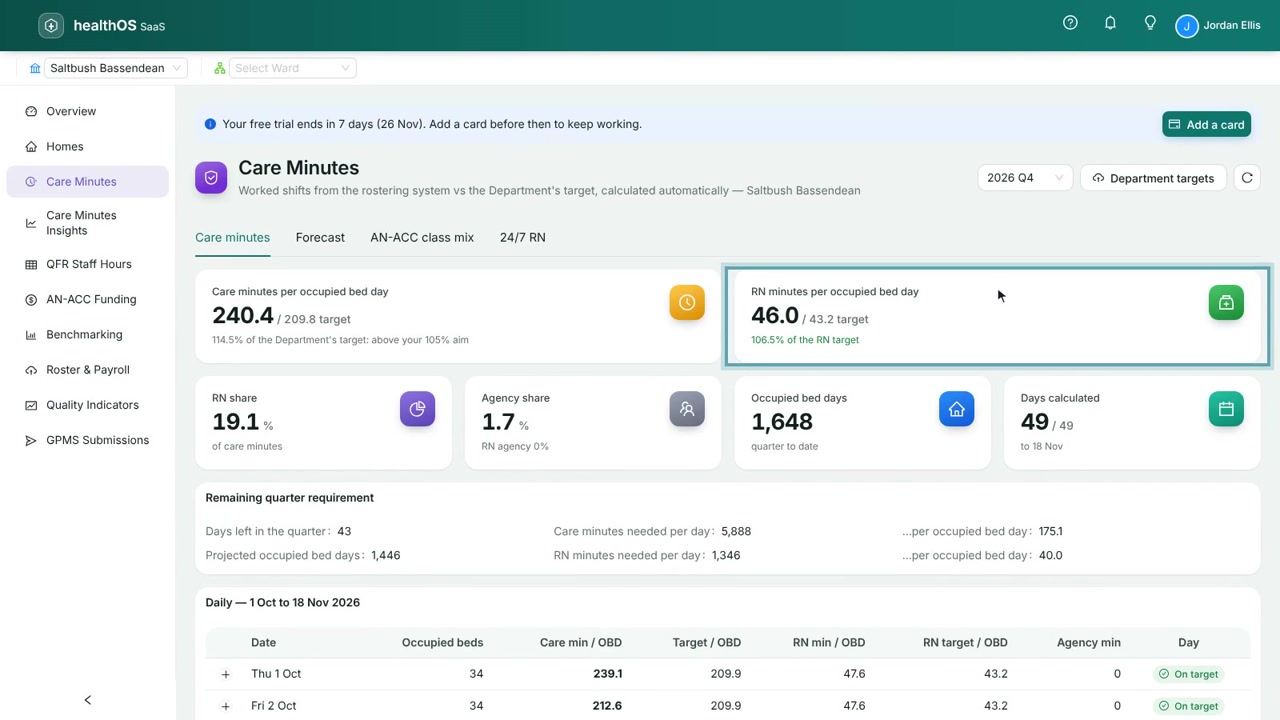
Care Minutes Periscope works out care minutes and 24/7 registered nurse cover every day, from the shifts your staff worked and each resident’s funding class.
- Shortfalls seen in time. The rest of the quarter is forecast for every home, so a shortfall or over-rostering shows while you can still roster for it.
- Keep the 24/7 registered nurse supplement. Each night’s registered nurse cover comes from the roster, gaps are flagged, and the monthly report is lodged through the government's provider system.
- Nothing to re-key or replace. Worked shifts come from the rostering or payroll system you already run, with no implementation project.
- No Provider Digital Access logins. Set up once, then HealthOS reads each resident’s funding class from Services Australia every morning.
Tech preview, free until 1 January 2027. Parts of the product are still being finished, so nothing is charged while the preview runs. Sign up without a card and add one whenever you like. We may end the preview earlier, and you will hear from us before anything is charged.
 5:14
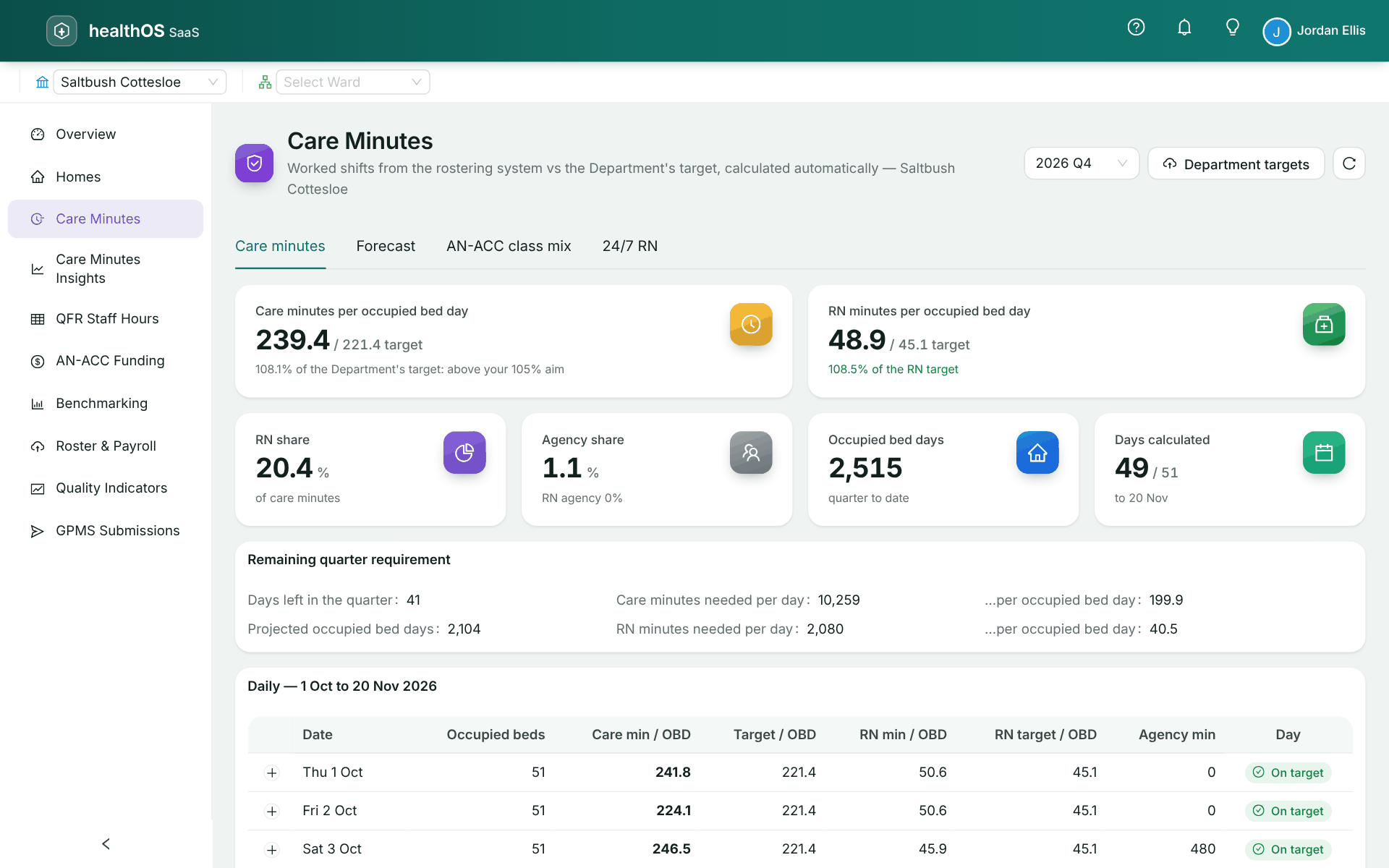
Quarter to date against the target for the residents in each home, with what is left to deliver.
Coverage from the roster, gaps flagged, the monthly report lodged through the government's provider system.
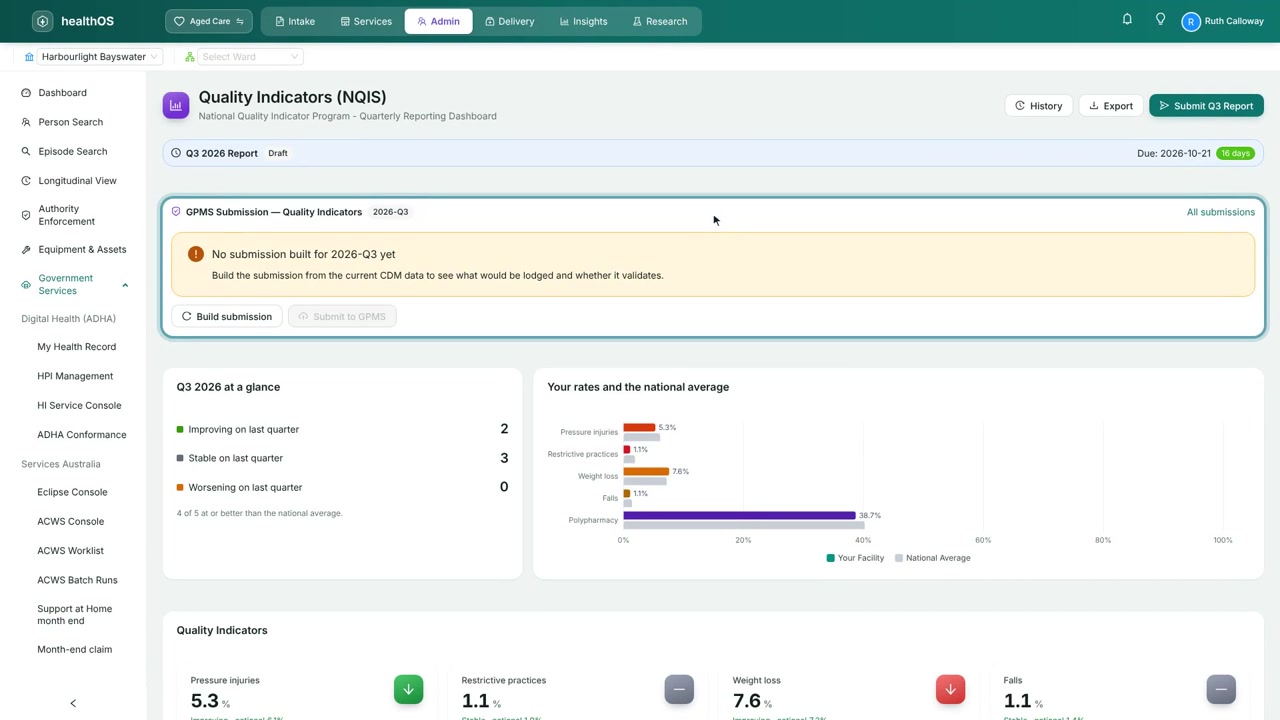
Filled from your clinical and quality systems, with residency from Services Australia’s Aged Care Web Services, and lodged through the government's provider system.
Residents and their classes read from Aged Care Web Services every morning, so each target is current.
The rest of the quarter from your forward roster: what to add, and the care hours above your aim that could come off.
What each class is worth, the quarter’s changes and which residents to review.
Your homes against homes like them, from the Department’s published targets.
Care Minutes Insights across every home, and the Quarterly Financial Report’s staff hours from the shifts already in.
Every home’s position, every day
Care minutes and 24/7 registered nurse cover are worked out from the roster. In most homes that is done at the end of the quarter, when nothing can be done about the result. Care Minutes Periscope does it every day, for your care managers, quality leads and workforce staff.
- By export and spreadsheetA payroll export and a spreadsheet at the end of every quarterIn Care Minutes PeriscopeWorked out every day, from the shifts as they are worked
- By export and spreadsheetThe figure known after the quarter has closedIn Care Minutes PeriscopeThe rest of the quarter forecast, while there is still time to roster for it
- By export and spreadsheetResidents and their funding classes kept up to date by handIn Care Minutes PeriscopeResidents and classes read from Aged Care Web Services every morning
- By export and spreadsheetA registered nurse gap found when the month’s report is put togetherIn Care Minutes PeriscopeEach night’s registered nurse gaps flagged by home and date
- By export and spreadsheetThe 24/7 registered nurse report keyed into the government's provider system portalIn Care Minutes PeriscopeBuilt from the shifts and lodged through the government's provider system, with its receipt
Nothing to re-key, whichever roster you run
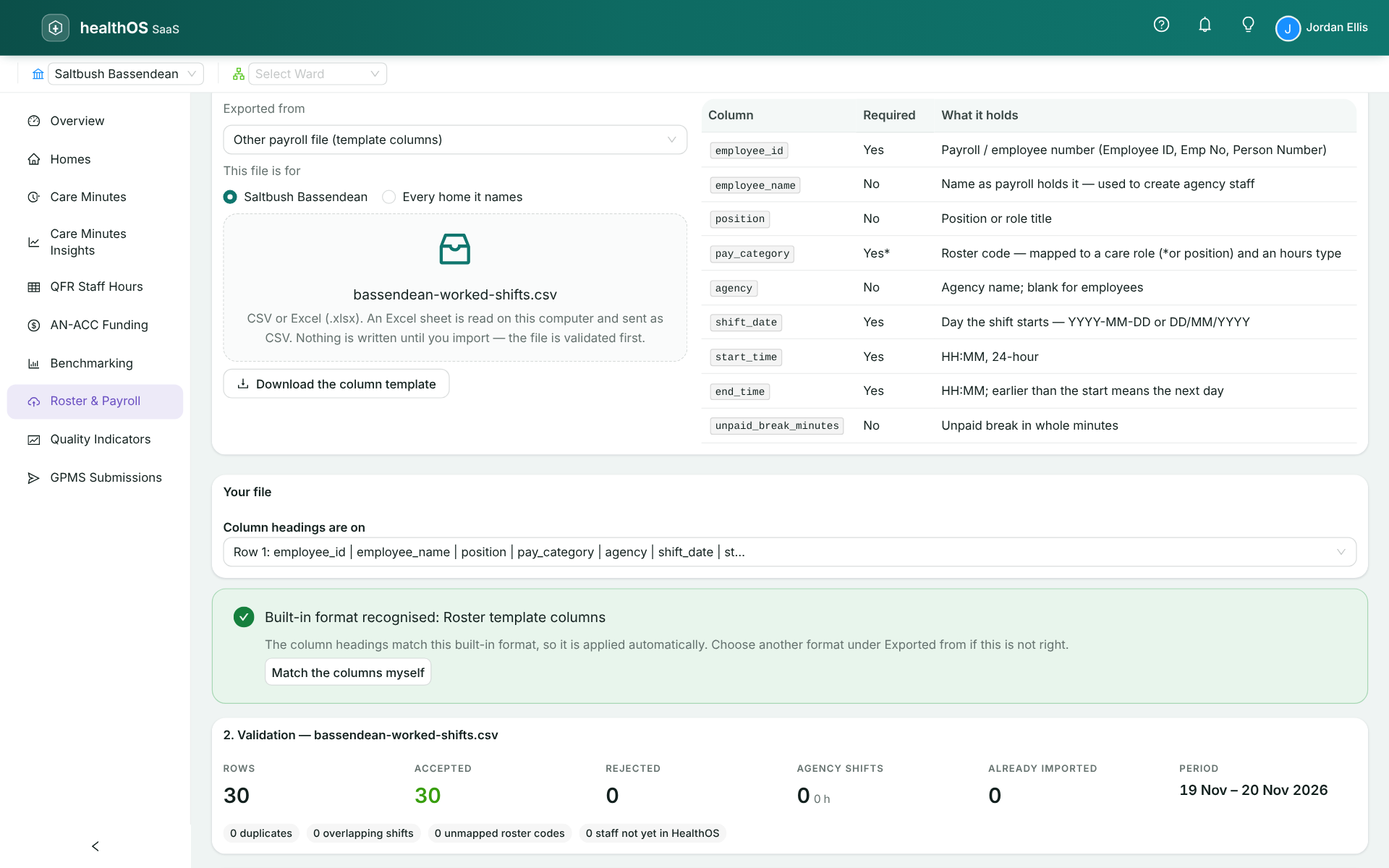
The government does not hold the hours your staff worked, so they come from your own systems. Upload a spreadsheet export from your rostering or payroll system: the common export layouts are read as they come, and any other system can export to the HealthOS worked-shifts format.
Or connect once and stop uploading: a rostering system’s system connection sends approved timecards every day, and a payroll data warehouse is read every night. Nothing changes in the systems you run.
Whichever way a shift arrives, it goes through the same checks. Each pay category is mapped once to a care role. Anything that cannot be placed is held for you instead of being counted wrongly: an unmapped pay category, an unknown staff member, a duplicate line or an overlapping shift.
- Uploaded: a spreadsheet export from any rostering or payroll system
- Connected: a rostering system’s system connection, daily, or a payroll data warehouse, nightly
- Pay categories mapped once to registered nurse, enrolled nurse, personal care and allied roles
- Agency shifts counted and shown separately; exceptions held for a person to resolve
No Provider Digital Access logins, and reports lodged for you
HealthOS reads your residents and their funding classes from Services Australia, and lodges your 24/7 registered nurse report and Quality Indicators through the government's provider system, with your organisation’s own credentials. Both connections have passed the agencies’ testing: see where each stands.
Targets that match your residents
The target comes from the residents in each home on each day, at the funding class they held, and Services Australia already knows both. Through your own Provider Digital Access device, HealthOS reads Aged Care Web Services every morning: who is in care at each home, by its residential care service id, and each resident’s funding class. There is nothing to upload or re-key, and a reassessment changes the target from the day it applied.
Each month, the payment statement is read too and checked class by class against what Services Australia paid.
- Residents and funding classes read from Aged Care Web Services every morning
- Class history kept, so a reassessment changes the target from the day it applied
- The monthly payment statement checked class by class
Keep the 24/7 registered nurse supplement
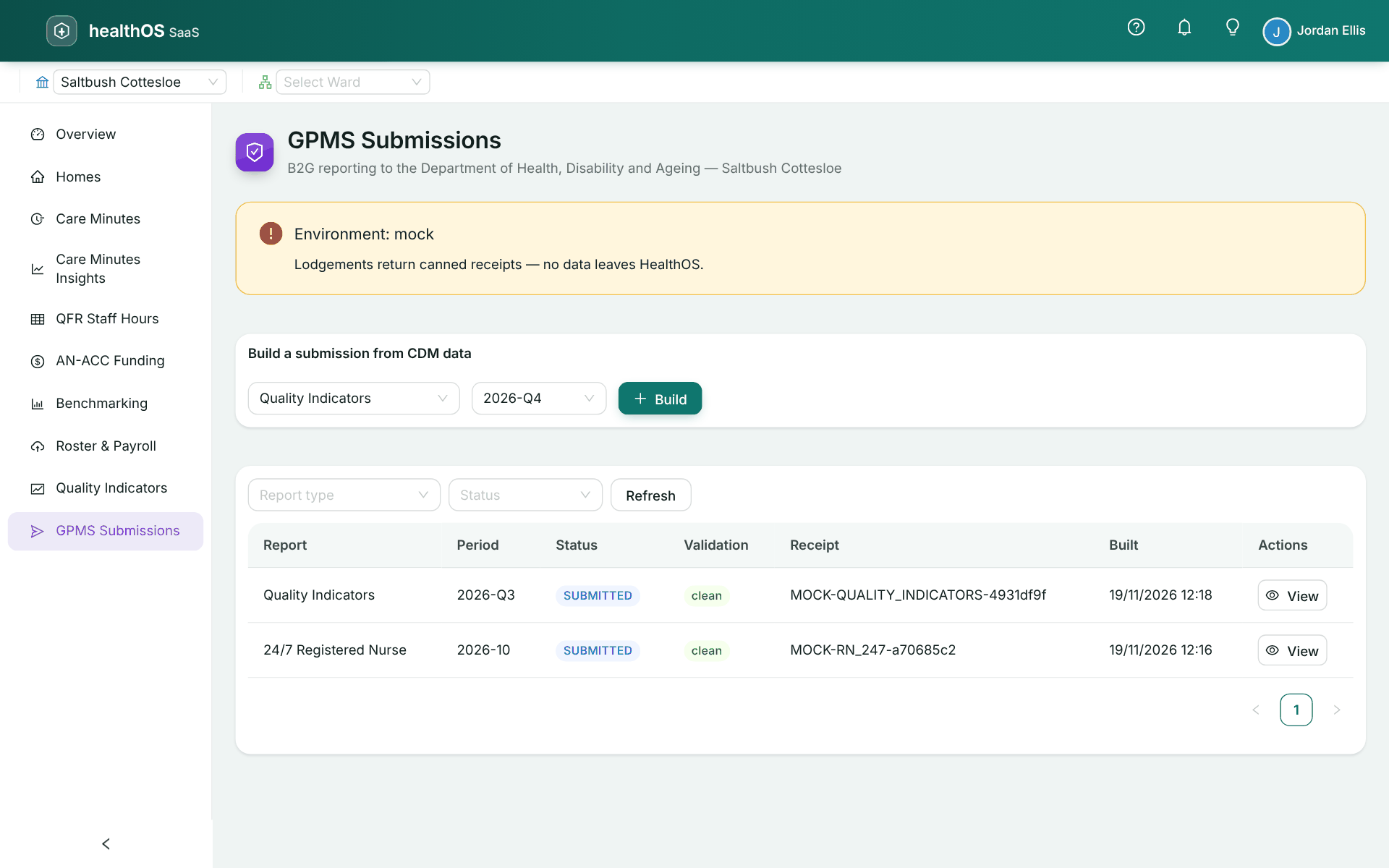
Each night's registered nurse coverage comes from the roster, gaps are flagged by home and date, and alternative arrangements are recorded against them. At month end the report is built from the shifts, checked against the Department’s specification, signed off under the submitter’s own Government Provider Management System identity with the declaration, and lodged through the government's provider system, with its receipt kept.
The quarter’s Quality Indicators fill from your clinical and quality systems, with who was resident from Aged Care Web Services, and are lodged through the government's provider system the same way. Care minutes and the Quarterly Financial Report have no lodgement interface, so HealthOS prepares the figures to key into the government's provider system portal and says so.
- 24/7 registered nurse reports lodged through the government's provider system, with the receipt
- Quality Indicators lodged through the government's provider system
- Care minutes and the Quarterly Financial Report figures prepared for the portal
Running in one sitting
Two set-up guides walk you through it, both with your organisation’s own credentials, never ours. Each finishes with a test call to the Department or Services Australia, so you know it works before the month ends.
For the government's provider system: your machine credential from the Relationship Authorisation Manager and its ABN, registering HealthOS, matching each of your Government Provider Management System services to a home and its places, and the government's provider system identity of each person who will submit. For Aged Care Web Services: your Provider Digital Access device, by its RA number and name, the activation code Provider Digital Access issues, and each home’s residential care service id.
$129 per user a month, free in the tech preview
One monthly subscription, priced per person who signs in, whatever the size of your homes: care managers, quality leads and workforce staff. Add or remove users as your team changes. There is no bed licence. While the tech preview runs, nothing is charged: sign up without a card and add one whenever you like. The preview is planned until 1 January 2027, and you will hear from us before anything is charged. Taking another HealthOS online product as well, such as Aged Care Purser, adds it to the same subscription and the same bill.
What providers ask us first
| Question | Answer |
|---|---|
| Are the targets the Department's? | The targets are worked out from each resident's funding class, read from Aged Care Web Services, using the published care minutes per class. The government's provider system has no interface for reading your official targets, so confirm them against the Department's figures. |
| What do I need to connect? | For the government's provider system, your organisation's machine credential, registered against your ABN, and a Government Provider Management System identity for each person who will submit. For Aged Care Web Services, a Provider Digital Access device registered to your organisation and each home's residential care service id. The set-up guides cover each step. |
| Where is my data kept? | In Microsoft Azure in Australia, in a tenancy that the database itself keeps apart from every other subscriber's. |
| Can I start today? | Yes. Care Minutes Periscope is in tech preview: join the tech preview, no card needed, and nothing is charged before 1 January 2027 (or an earlier end to the preview, which we will tell you about first). |
Watch a quarter come together
Know your care minutes before the quarter ends
Care Minutes Periscope is in tech preview for residential aged care providers: free until 1 January 2027, then $129 per user a month. Join with your work email, no card needed.